
Thermostat Compatibility Checklist for HVAC Systems
Avoid HVAC disasters by ensuring your thermostat is compatible with your system. Pairing the wrong thermostat with your HVAC setup can lead to costly damage, inefficiency, and even complete system failure. Here’s what you need to know:
- Why Compatibility Matters: Using the wrong thermostat can fry electronics, blow fuses, or damage your system’s circuit board, costing up to $300 in repairs.
- Potential Savings: ENERGY STAR smart thermostats can cut heating and cooling costs by 8% annually - around $50–$100 per year.
- Key Steps: Identify your HVAC type (e.g., forced air, heat pump, radiant), check wiring (C-wire, voltage, staging), and verify compatibility using tools from brands like Nest, ecobee, or Honeywell.
- When to Call a Pro: Complex systems like multi-stage, zoned, or high-voltage setups often require professional installation to avoid costly mistakes.
Following this guide ensures your thermostat works efficiently, saves energy, and protects your HVAC investment. Let’s break down the steps to get it right.
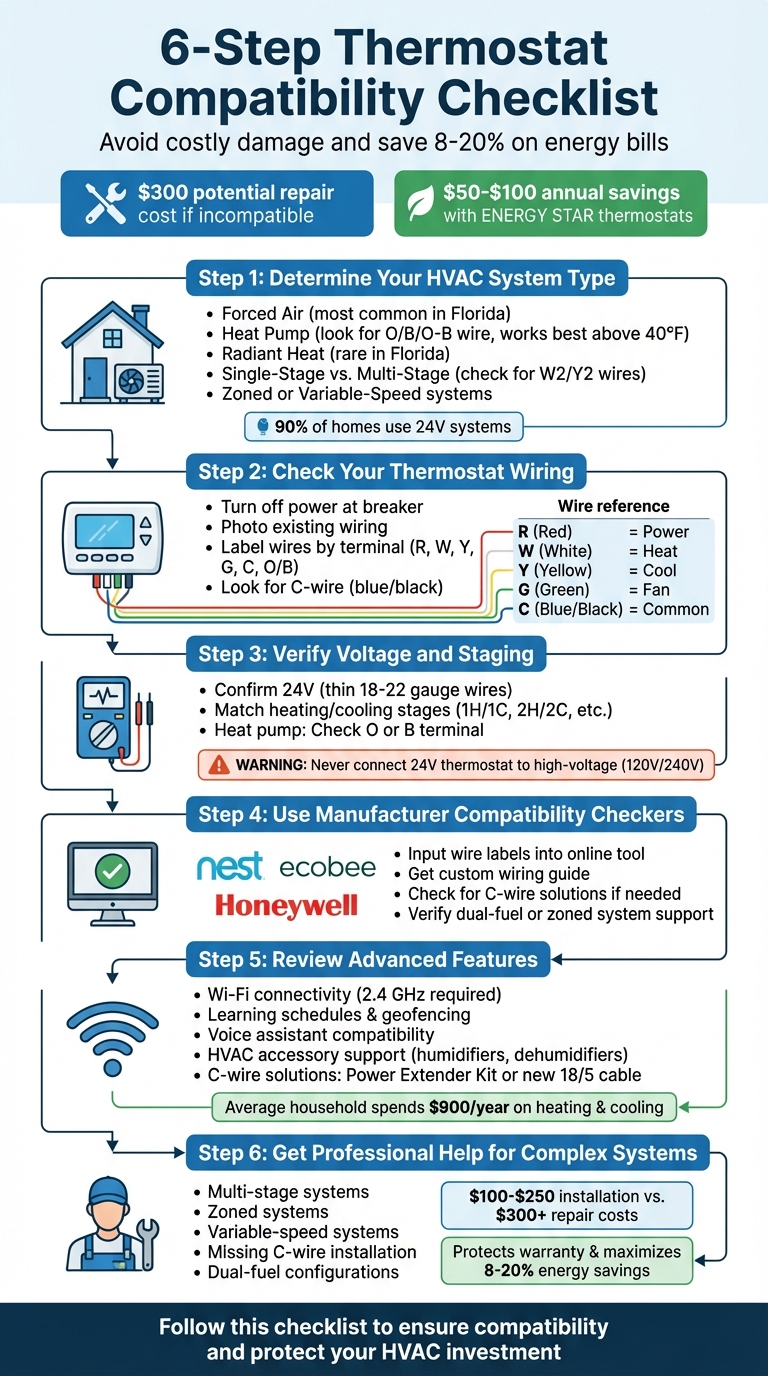
6-Step Thermostat Compatibility Checklist for HVAC Systems
Top 12 Problems/Mistakes when Installing or Replacing Thermostats! HVAC Tips!
sbb-itb-ab7d5a1
Step 1: Determine Your HVAC System Type
Choosing the right thermostat starts with understanding your HVAC system type. This ensures compatibility and avoids potential issues like equipment damage or losing heating or cooling when it's most needed. Different systems come with unique wiring setups and voltage requirements, so knowing your system is crucial.
Forced Air, Heat Pump, or Radiant Heat
Forced air systems are the most common in Florida homes. These systems rely on ducts and vents connected to a furnace or air handler, distributing heated air through ductwork. If your home has central air conditioning paired with a furnace, you’re likely working with a forced air system.
Heat pump systems resemble standard air conditioners from the outside but offer both heating and cooling by reversing the refrigerant flow. These systems are popular in all-electric homes in Florida. To identify a heat pump, look for a wire connected to the "O", "B", or "O/B" terminal. You can also check the outdoor unit’s manufacturer label and search the model number online to confirm if it’s a heat pump or a straight-cool air conditioner. Heat pumps are ideal for Florida's mild winters since they perform best when outdoor temperatures stay above 40°F.
Radiant heat systems, on the other hand, don’t use ducts. Instead, they distribute heat through steam or hot water radiators or electric baseboard heaters. These systems are rare in Florida but may appear in older buildings or specific non-residential spaces. If you spot radiators or baseboard heaters rather than vents, you likely have a radiant system.
| System Type | Indoor Components | Outdoor Components | Distribution Method |
|---|---|---|---|
| Split (Furnace/AC) | Furnace + Evaporator Coil | Condenser Unit | Ductwork / Vents |
| Heat Pump | Air Handler (Blower) | Heat Pump Unit | Ductwork / Vents |
| Packaged System | None (All-in-one) | Large Metal Box | Ductwork |
| Radiant / Baseboard | Radiators or Baseboards | None | Convection / Radiation |
Single-Stage vs. Multi-Stage Systems
Single-stage systems either run at full capacity or turn off completely. While they are less expensive to install, they can lead to uneven temperatures and higher energy costs since they always operate at maximum power.
Multi-stage systems (often two-stage) offer more flexibility by running at a lower setting during moderate weather and ramping up during extreme conditions. This results in more consistent temperatures and better energy efficiency. To check if you have a multi-stage system, remove your thermostat cover and look for wires connected to W2 (second-stage heat) or Y2 (second-stage cooling), in addition to W1 and Y1. If these connections are present, your system is multi-stage, and you’ll need a thermostat that supports these additional stages to maintain its efficiency. It’s worth noting that about 90% of homes in the U.S. and Canada use low-voltage (24V) systems like central furnaces or heat pumps.
Zoned or Variable-Speed Systems
A zoned system divides your home into different areas, each controlled by its own thermostat. These systems use motorized dampers in the ductwork to direct airflow, managed by a central control panel. If you see a "zone control panel" near your furnace or air handler, you likely have a zoned system. Each zone requires a compatible thermostat to function effectively.
Variable-speed systems continuously adjust their output rather than cycling on and off at fixed speeds. These advanced systems often require specific smart or "communicating" thermostats to unlock their full potential. Look for wiring labeled G2, G3, GL, GM, or GH, which indicates multiple fan speeds. Some high-end variable-speed systems use proprietary thermostats from the manufacturer, which may not work with generic smart thermostats without an adapter.
With your HVAC system type identified, you’re ready to move on to verifying your thermostat wiring in Step 2.
Step 2: Check Your Thermostat Wiring
Before diving into the wiring, make sure your HVAC system is compatible with your new thermostat. Start by turning off the power at the breaker box - simply switching off the thermostat isn’t enough to cut power to your HVAC equipment. Once the breaker is off, wait a few minutes and confirm that the system is completely inactive. To be extra cautious, use a non-contact voltage tester to ensure no current is flowing.
Review Wire Labels and Connections
Carefully remove the faceplate of your thermostat to expose the wiring. Take a quick photo of the wiring setup for reference before disconnecting anything. You’ll notice thin wires connected to terminals marked with letters like R, W, Y, G, C, and O/B.
"Refer to your thermostat's manual for wiring details. Also check to see which wires are connected to which terminals on your existing thermostat." - Lowe's
Identify wires based on their terminal labels, not just their color. While red wires often connect to R and yellow to Y, this isn’t always guaranteed since installers may not follow standard color coding. As you disconnect each wire, label it using the stickers that came with your new thermostat or use painter’s tape. Secure the wires to the wall with tape to keep them from slipping back into the hole.
| Terminal Label | Standard Wire Color | Function |
|---|---|---|
| R / Rh / Rc | Red | 24V Power (Heating/Cooling) |
| W / W1 | White | Heating Stage 1 |
| Y / Y1 | Yellow | Cooling Stage 1 |
| G | Green | Fan Control |
| C | Blue / Black | Common (Continuous Power) |
| O / B | Orange | Reversing Valve (Heat Pumps) |
| W2 / Aux | Various | Heating Stage 2 / Auxiliary Heat |
If the terminal labels are unclear or missing, you can check the control board inside your HVAC system to see where each wire originates. Some systems with labels like A–B–C or 1–2–3 use manufacturer-specific protocols and may need a thermostat designed for that system.
Look for a C-Wire
The C-wire, or Common wire, is essential for providing continuous 24V power to smart thermostats with advanced features like Wi-Fi, touchscreens, or backlit displays. Without it, these thermostats might drain batteries quickly or cause operational issues.
Check if your current thermostat has a wire connected to the "C" terminal. If the terminal is empty, gently pull out the wire bundle from the wall - sometimes an unused blue or black wire is tucked inside. Homes built in the last 40 years often include a C-wire as part of the thermostat cable.
"As a rule of thumb, newer homes (built in the last 40 years) generally have the proper wiring for installing any smart thermostat, including a C wire." - Sensi
If no C-wire is present at the thermostat, you can inspect the HVAC control board inside your furnace or air handler to see if the "C" terminal has a connected wire. If your system lacks a C-wire entirely, you have three options: install a C-wire adapter at the furnace, run a new 18/5 wire bundle, or choose a thermostat that doesn’t require a C-wire. Be cautious with thermostats claiming to work without a C-wire by pulsing the heat wire for power, as this can lead to frequent cycling of your furnace.
Identify Low-Voltage vs. High-Voltage Systems
Most residential HVAC systems use low-voltage (24V) wiring, which consists of thin, 18- to 22-gauge wires, similar to doorbell wiring. These connect to small screw terminals labeled with letters. High-voltage systems (120V/240V), on the other hand, use thicker wires - usually black or red - secured with wire nuts.
"If you see thick, black, or red wires, you have a line voltage system. This type of wiring requires a line voltage thermostat and is not compatible with low voltage thermostats." - Honeywell Home
Check the back of your thermostat for markings like "110 VAC", "120 VAC", or "240 VAC" to confirm if it’s a high-voltage system. Most modern smart thermostats are built for 24V systems and can be damaged if connected to high-voltage lines. High-voltage setups are common in electric baseboard heaters or older radiant heating systems, which often require professional installation.
| Feature | Low-Voltage (24V) | High-Voltage (120V/240V) |
|---|---|---|
| Wire Thickness | Thin (18–22 gauge) | Thick (12–14 gauge) |
| Wire Colors | Multi-colored (Red, White, Yellow, etc.) | Typically Black, Red, or White |
| Connection Type | Small screw terminals (R, W, Y, G) | Wire nuts or thick connectors |
| Common Systems | Central Heat/AC, Heat Pumps, Furnaces | Electric Baseboard, Radiant Heat |
| DIY Safety | Generally safe for DIY installation | Requires professional installation |
After documenting your wiring, you’ll be ready to move on and verify voltage and staging requirements in Step 3.
Step 3: Verify Voltage and Staging Requirements
Once you've documented your wiring, the next step is to confirm that your thermostat's voltage and staging settings align with your HVAC system. This step is crucial to avoid damaging your equipment and to keep your system running efficiently.
Confirm 24V Compatibility
Most residential HVAC systems, like central air conditioning, gas furnaces, oil/propane furnaces, and heat pumps, operate on 24V low-voltage power. If you noticed thin 18- to 22-gauge wires during Step 2, it's a good indication that your system is 24V.
To confirm, check for a "24VAC" label on your old thermostat or your furnace's control board. Alternatively, you can use a multimeter set to AC voltage to measure between the R (power) and C (common) wires. A reading close to 27V AC is typical.
"The thermostat operates on 24 volts AC, however a technician may actually see about 27 volts AC on the test instruments." - Jim Dorsey, HVAC Writer and Reviewer
Never connect a 24V thermostat to a high-voltage system. If your thermostat has thick wires (12–14 gauge) with wire nuts or is labeled "110 VAC", "120 VAC", or "240 VAC", your system is high-voltage and needs a line-voltage thermostat. Using a 24V thermostat in a high-voltage setup can lead to equipment damage and safety risks.
Once you've confirmed the voltage, ensure the thermostat supports the right heating and cooling stages for your system.
Match Cooling and Heating Stages
Your thermostat's stage compatibility must match your HVAC system's setup. Single-stage systems operate in an all-or-nothing mode: they either run at full capacity or are completely off. Multi-stage systems, on the other hand, can adjust their output to improve comfort and efficiency.
To determine your system's staging, look at the wires connected to your old thermostat. A single-stage setup will typically have one heating wire (W or W1) and one cooling wire (Y or Y1). Multi-stage systems may include additional wires, such as W2 or Y2, for extra heating or cooling stages.
Thermostat packaging often provides shorthand codes for stage compatibility. For instance:
- 1H/1C: Supports one stage of heating and cooling (single-stage systems).
- 2H/2C: Supports two stages of heating and cooling.
If your furnace has W1 and W2 wires, you'll need a thermostat rated for at least 2H.
| System Type | Wiring Terminals | Thermostat Rating Needed |
|---|---|---|
| Single-Stage Heat/Cool | W1, Y1 | 1H/1C |
| Two-Stage Heat, Single Cool | W1, W2, Y1 | 2H/1C |
| Two-Stage Heat/Cool | W1, W2, Y1, Y2 | 2H/2C |
| Three-Stage Heat | W1, W2, W3 | 3H/1C or higher |
If you're unsure about your system's staging, check the labels on the control board inside your furnace or air handler - they'll clearly indicate if multiple stages are supported.
Next, it's time to check for specific wiring needs if you have a heat pump system.
Special Requirements for Heat Pump Systems
Heat pumps have unique wiring requirements because they rely on a reversing valve to switch between heating and cooling. Most systems use the "O" terminal for cooling mode, but brands like Rheem and Ruud use the "B" terminal for heating mode. Be sure to confirm which terminal your system uses before selecting a thermostat.
"The reversing valve only has two positions: on and off." - Tim H., Lead Building Engineer
In addition, heat pumps often include auxiliary heat (electric heat strips for very cold conditions) and emergency heat (a backup for system failures). These functions require "Aux" and "E" terminals on your thermostat. If your current setup has jumper wires connecting Aux and E, note this detail, as modern thermostats may manage these features separately.
Heat pump systems typically use 5 to 7 wires, though more advanced setups with multiple stages can require up to 8. If your heat pump is paired with a gas furnace (dual-fuel system), you'll need a thermostat designed to handle two fuel sources. These systems often require professional configuration to ensure proper switching between the heat pump and furnace at the right temperature thresholds.
Step 4: Use Manufacturer Compatibility Checkers
Once you’ve documented your wiring and voltage details, the next step is to confirm thermostat compatibility. Many leading thermostat manufacturers, like Google Nest, ecobee, and Honeywell, offer free online tools to help you determine if their devices will work with your setup.
Nest, ecobee, and Honeywell Compatibility Tools
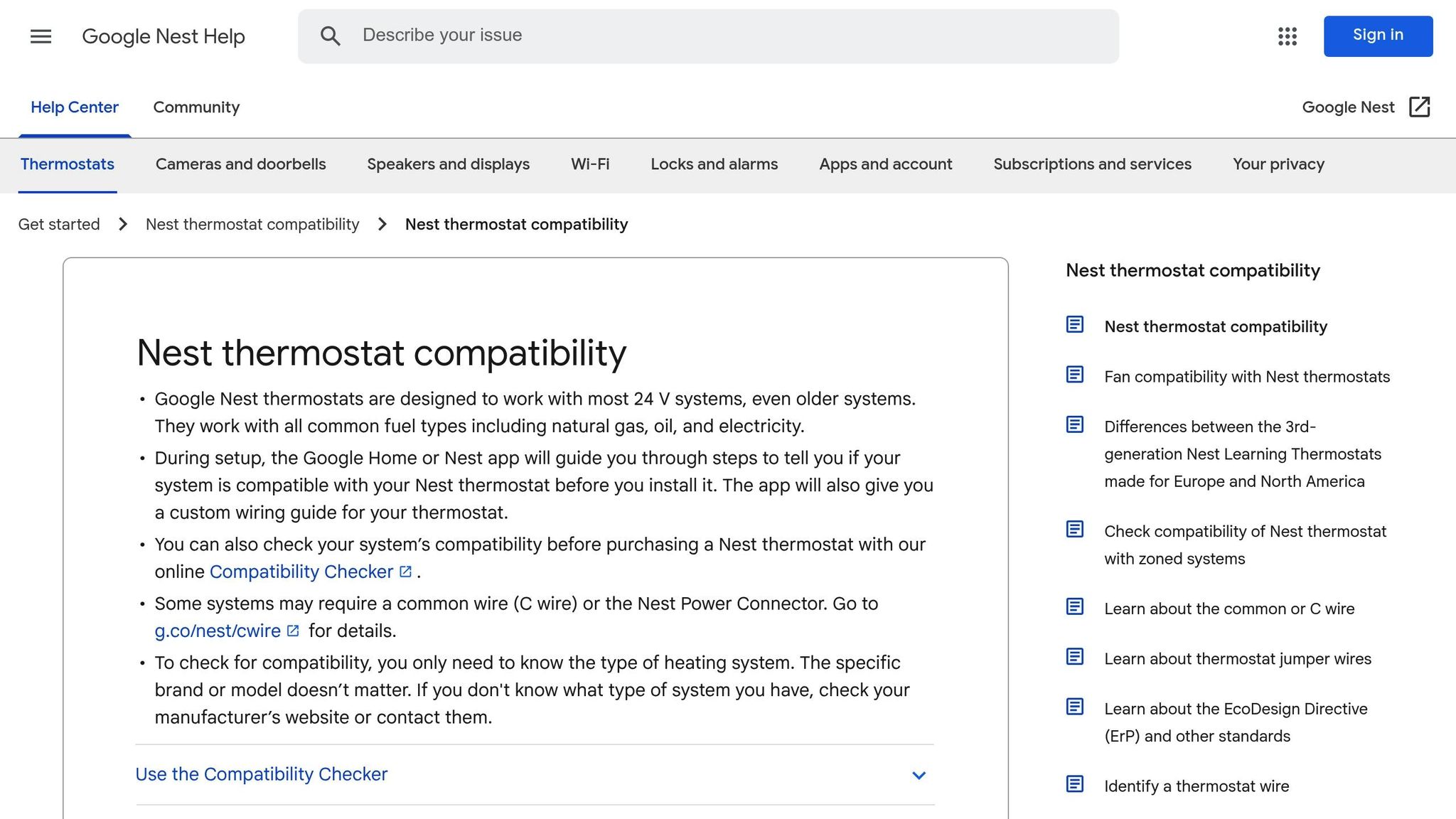
Start by ensuring your HVAC system is powered off at the breaker. Then, take a clear photo of your existing wiring for reference - it’ll come in handy when using the compatibility tools.
Google Nest offers its compatibility checker both as an online widget and within the Google Home app during setup. Similarly, ecobee provides a guided 7-step process to evaluate whether their thermostats are suitable for your home. These tools typically ask you to input the wire labels (e.g., R, W, Y, G, C) from your current setup. Be sure to enter only the labels for wires coming directly from the wall - skip any short "jumper" wires that connect terminals.
The tools are designed to flag potential incompatibilities. For example, systems with thick wires and wire nuts (indicating high voltage, like 120V or 240V), stranded wires instead of solid core, or proprietary labels (e.g., A, B, C or 1, 2, 3) may be marked as unsuitable for standard smart thermostats. If issues arise, the tool will notify you of potential challenges.
Most of these compatibility checkers provide results in just a few minutes. They often include a custom wiring guide for installation. If the tool determines that a C-wire is required but missing in your system, it may suggest solutions like the Nest Power Connector or a C-wire adapter.
Verify Compatibility with Your HVAC Model
While these tools focus on wiring compatibility, they may not account for every feature of your HVAC system. If your setup includes advanced components - like humidifiers, dehumidifiers, or a dual-fuel configuration (a heat pump paired with a furnace) - you’ll need to ensure the thermostat you choose can handle these features.
For dual-fuel systems, the checker might recommend specific models such as the Nest Learning Thermostat or suggest professional installation. Zoned systems that use dampers may also require a dedicated C-wire for consistent power. In these cases, it’s a good idea to review the thermostat’s technical specifications on the manufacturer’s website. If you’re still unsure, consulting a professional before purchasing is a smart move.
Once you’ve confirmed compatibility, you’re ready to explore advanced features and accessories in Step 5.
Step 5: Review Advanced Features and Accessories
Wi‑Fi and Smart Thermostat Features
Smart thermostats come packed with features like Wi‑Fi connectivity, allowing you to adjust settings remotely and take advantage of automated energy-saving options. Many models can "learn" your household's daily routines, creating schedules that align with your habits. Geofencing technology adds another layer of convenience by adjusting temperatures automatically when you leave or return home. Some even use occupancy and remote temperature sensors to handle hot or cold spots in busy areas of your home [2, 40].
These devices also offer practical tools like maintenance alerts for filter changes or extreme temperatures and provide energy usage reports to help you make smarter decisions. Considering that the average American household spends over $900 yearly on heating and cooling, switching to an ENERGY STAR–certified smart thermostat could trim these costs by 8% to 20% [2, 40].
For smooth operation, most smart thermostats rely on a 2.4 GHz Wi‑Fi connection. Make sure your device is within range of your router, or consider a range extender if needed [2, 29]. Many models are also compatible with voice assistants like Amazon Alexa or Google Assistant, and some even include built-in speakers for streaming music.
Lastly, check if your thermostat supports HVAC accessories to further enhance your system's performance.
Compatibility with HVAC Accessories
If your HVAC setup includes add-ons like humidifiers, dehumidifiers, UV lights, or ventilators, it’s crucial to choose a thermostat that can manage these components. Look at the thermostat’s backplate for accessory terminals (commonly labeled ACC+ and ACC−) to ensure compatibility [42, 43]. Some thermostats support only one-wire accessories, while others can handle both one-wire and two-wire configurations. However, systems requiring a Power Extender Kit (PEK) for a missing C-wire may face limitations, as some thermostats cannot support both the adapter and an accessory at the same time. Always consult your accessory manuals for specific requirements.
Solutions for Missing C‑Wires or Millivolt Systems
Advanced smart thermostats often need a reliable power source, which is where C-wires come in. If your system lacks one, Power Extender Kits (PEK) can adapt a four-wire setup by adding an adapter to the HVAC control board [44, 46]. For a long-term solution, consider running new 18/5 thermostat cable, which offers the most dependable results.
"We recommend using a C-wire to provide power to your smart thermostat, since that is the most straightforward way." – John Galeotafiore, Manager of Thermostat Testing, Consumer Reports
Before purchasing an adapter, check behind your wall plate for an unused C-wire - it might already be there. Keep in mind that standard smart thermostats designed for 24 VAC systems are not compatible with millivolt systems (like gas fireplaces or floor heaters) or high-voltage 120 V/240 V baseboard electric heating [45, 29]. Always turn off power at the breaker panel before working with wires to avoid any accidents or damage.
Step 6: Get Professional Help for Complex Systems
Why Professional Installation Helps
Once you've checked the wiring and compatibility, it might be time to call in a professional - especially if you're dealing with a more complex HVAC system. While swapping out a basic thermostat can be a DIY project for many homeowners, advanced systems often require a trained touch. Mistakes with wiring, like misconnecting the common wire, can lead to expensive problems. For example, a short-circuited control board could cost you around $300 in repairs. As Consumer Reports wisely notes:
"It would cost a lot more to fix a shorted-out air handler than it would to install a thermostat".
Professional installation is particularly important for systems like variable-speed, multi-stage, or zoned setups. These systems rely on thermostats capable of managing advanced communication protocols. Licensed technicians handle critical tasks like verifying heat pump balance points, staging, and configuring dip-switch settings. They also ensure the thermostat is placed in the right location - away from windows or vents - to avoid temperature inaccuracies that could hurt your system's efficiency.
Beyond avoiding costly mistakes, professional installation often protects your warranty, ensures advanced features (like Wi-Fi and geofencing) are properly configured, and helps you make the most of energy savings. A well-installed smart thermostat can save between 8% and 20% on energy bills. Keep in mind, many manufacturers require certified technicians for warranty coverage. With professional labor typically costing $100 to $250, it's a smart investment compared to the potential costs of repairs or inefficiencies. Getting professional help is more than just a safety net - it’s a step toward maximizing your thermostat’s performance and your home’s comfort.
West Florida Air's Services
If you live in Pasco, Pinellas, or Hernando counties, West Florida Air Conditioning & Heating Inc. offers the local expertise you can count on. This veteran-owned company specializes in ensuring compatibility for multi-stage and zoned systems, including installing C-wire adapters when necessary. They’re experienced in setting up smart thermostats for heat pump systems and ductless configurations.
But their services go beyond thermostat installation. They provide a full range of HVAC solutions, including 24/7 emergency repairs, routine system maintenance, indoor air quality improvements, and zone control installations. Their focus on customer satisfaction ensures your smart thermostat integrates seamlessly with your HVAC system. To learn more or schedule a consultation, visit West Florida Air. They even offer flexible financing options, with plans ranging from 12 to 60 months, making it easier to invest in your comfort and peace of mind.
Conclusion
Selecting the right thermostat for your HVAC system requires careful consideration to ensure compatibility. Following a structured approach can help you avoid costly errors and keep your home comfortable throughout the year. Start by determining your system type - whether it's forced air, a heat pump, or radiant heating - as this will guide you toward thermostats that are compatible with your equipment.
Next, examine your wiring for critical details. Check for the presence of a C-wire, which is crucial for powering smart thermostats. Confirm that your system operates on standard 24V and verify that your heating and cooling stages align properly to avoid short cycling. Short cycling can lead to inefficient operation and higher energy bills. As Environment Masters explains:
"Choosing the wrong thermostat can cause a range of issues, from energy inefficiency to total system malfunction".
For added assurance, use compatibility tools provided by brands like Nest, ecobee, or Honeywell to verify your wiring setup. If you have a multi-stage, zoned, or variable-speed system - or if your wiring lacks a C-wire - professional installation is often the best choice. With heating and cooling accounting for over 40% of annual energy use in U.S. homes, taking these steps can help lower your utility costs by 8% to 20%.
FAQs
How do I know if my system is 24V or 120/240V?
To figure out whether your system is 24V or 120/240V, start by examining the wiring. If you see thin, multi-colored wires like R, C, W, Y, G, or O/B, this typically points to a low-voltage (24V) system. On the other hand, thick black, red, or white wires are a sign of a line-voltage (120/240V) system. For extra confirmation, check the labeling on your thermostat or HVAC system - it often specifies the voltage.
What’s the easiest way to add a C-wire for a smart thermostat?
To determine if you have a C-wire, start by removing your thermostat's faceplate and checking for a wire connected to the "C" terminal. If there's no C-wire, you have a few options: you can install a C-wire adapter, repurpose an existing wire like the G wire (though this might impact fan control), or call an HVAC professional for assistance. Using a C-wire adapter is usually the easiest route.
When should I hire West Florida Air Conditioning & Heating Inc. to install my thermostat?
If you're looking for expert help with thermostat installation, West Florida Air Conditioning & Heating Inc. is a solid choice. They ensure your thermostat is properly wired, compatible with your system, and optimized for peak performance - especially crucial for high-efficiency HVAC systems or setups with unique needs. Serving Pasco, Pinellas, and Hernando counties, they handle everything from standard installations to smart thermostat setups with a professional and customer-focused approach.